


Updated on November 9, 2026 by John Clarke


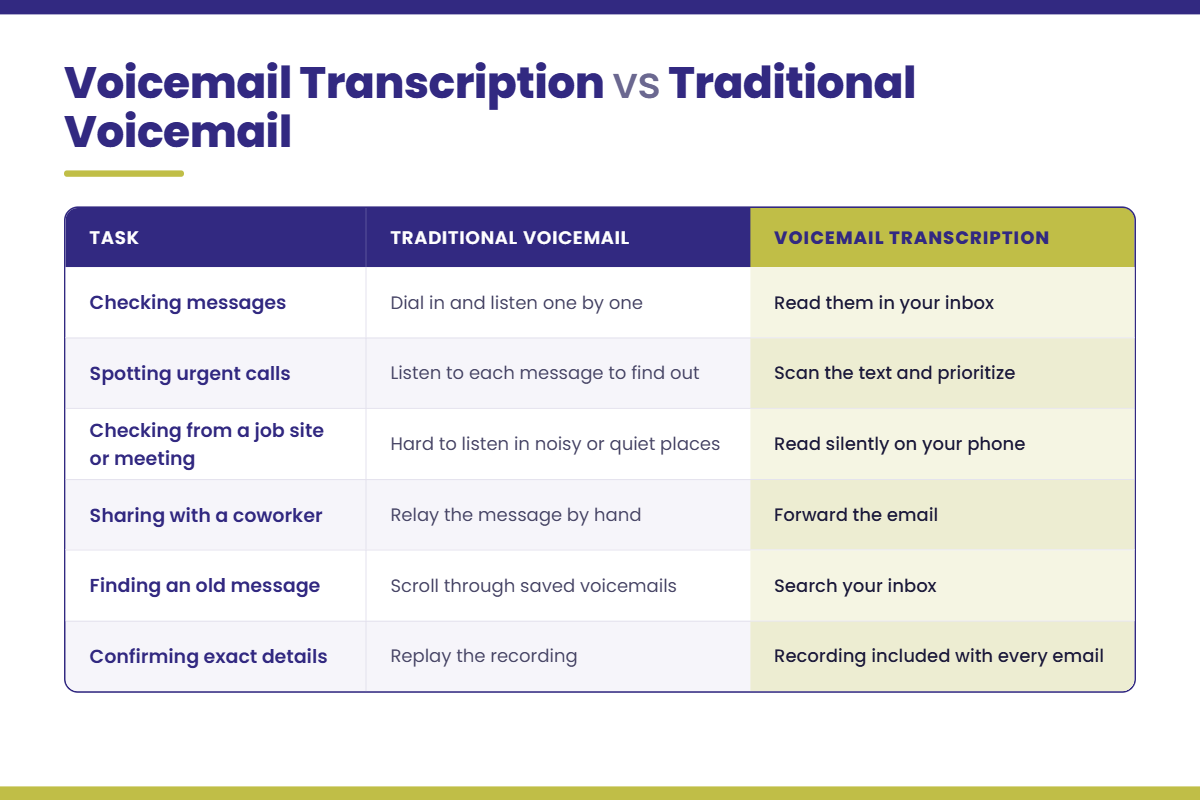
AI voicemail transcription turns every voicemail left on your business line into written text and sends it to your email, along with the original recording. You stop dialing in to listen to messages one at a time. You just read them. For businesses where a missed message can mean a lost job or sale, that time adds up quickly.
Some of our customers chose Ohio.net specifically for this feature. This guide covers how voicemail-to-text works on an Ohio.net phone system, which businesses get the most from it, where it falls short, and how to set it up so it works well from the first day.
Key Takeaways
- Ohio.net’s AI voicemail transcription sends a written version of each voicemail to your email, with the audio recording included.
- Reading a voicemail takes less time than listening to one, so you can sort urgent messages from routine ones between meetings or jobs.
- Transcripts arrive by email, so they can be read on any phone, tablet, or computer that gets email.
- Automated transcripts can miss names, phone numbers, or words spoken over background noise, which is why the recording always comes with the transcript.
- Voicemail transcription is an add-on to Ohio.net‘s business phone systems, so you only add it if it helps your business.
What Is AI Voicemail Transcription?
AI voicemail transcription uses speech recognition software to listen to a voicemail and write out what the caller said. The result lands in your inbox as a regular email you can read, search, forward, or save.
You may also hear it called voicemail to text. It goes a step beyond basic voicemail to email, which sends you the audio file and nothing else. With transcription, you get the audio and the words, so you can understand a message without pressing play.
Think of it as voicemail and email in one place. Messages don’t sit in a separate mailbox waiting for you to call in. They show up where you already spend your day. On Ohio.net, it runs as part of your business phone system, so there’s no separate app or vendor involved. And the same local support team that has served Northeast Ohio for more than 125 years is a phone call away if you need help.
How Voicemail-to-Text Works on an Ohio.net Phone System
The process runs on its own once it’s turned on:
- A caller reaches your business line and leaves a voicemail.
- The phone system records the message as usual.
- The AI converts the caller’s words into text.
- An email arrives in your inbox with the transcript and the recording.
- You read the message, decide what needs attention, and call back or forward it.
There’s nothing to install on your computer and no new habit to learn. If you can read an email, you can use voicemail transcription. It’s one of several VoIP add-ons from Ohio.net you can add to your phone system as your needs change.
Who Gets the Most From Voicemail Transcription
The value shows up in everyday moments, especially for teams that aren’t sitting at a desk.
- Home services companies. An HVAC owner is on a roof in Wooster when a customer leaves a message about a furnace that won’t start. The owner reads it on their phone in a few seconds, sees it’s urgent, and calls back right away instead of at the end of the day.
- Auto dealerships. A sales manager walks out of a meeting with five new voicemails. A quick scan shows one is a buyer ready to come in this afternoon. That call gets returned first.
- Medical and professional offices. The front desk comes back from lunch to a dozen messages. Instead of listening to each one, staff can sort cancellations, new patient calls, and billing questions in a few minutes.
- Remote and field teams. Staff who work from home or on the road can keep up with messages from anywhere. It pairs well with other VoIP tools for remote and field teams.
Transcription also helps employees who have trouble hearing. About 15 percent of American adults report some trouble hearing, and nearly a third of adults over 65 have some hearing loss, according to the National Institute on Deafness and Other Communication Disorders. A written message means nobody has to strain to catch a mumbled callback number.
How Accurate Is AI Voicemail Transcription?
For most everyday messages, AI transcription does its job well. A customer calling from a quiet office or kitchen to ask about an appointment will usually come through clearly enough to act on. It works best on clear speech with little noise in the background.
It can stumble in a few predictable situations:
- Heavy background noise, like traffic or a busy shop floor
- Weak cell connections that cut in and out
- Unusual names, street names, or business names
- Long strings of numbers, like account numbers
That’s why the recording is always included. When a detail matters, like a phone number or an address, play the audio to confirm it. A good rule of thumb: the transcript tells you what the call is about, and the recording confirms the fine print.
We’d rather tell you this up front than promise perfect transcripts. No speech recognition gets every word right every time. Knowing where it slips helps your team use it with confidence.
How to Set Up Voicemail Transcription for Your Team
A few small choices make transcription more useful from the start.
Update your voicemail greeting. Ask callers to leave their name and to say their callback number slowly. It helps the AI, and it helps whoever reads the message.
Decide where each mailbox’s messages should go. A service department’s voicemail might belong in a shared service inbox, while a manager’s messages go to their own email. Our local team can help you map this out.
Plan for sensitive information. For healthcare, insurance, and other regulated offices, remember that transcripts arrive by email. HHS guidance says providers can use email with patients when they apply reasonable safeguards. Check with your compliance lead about which inboxes should receive voicemail transcripts.
Frequently Asked Questions
Do I still get the voicemail recording?
Yes. Ohio.net’s voicemail transcription adds a written transcript without replacing the recording. Each email includes both the text of the message and the audio file. You can read the transcript for a quick overview and play the recording when you want to hear the caller’s tone or double-check a detail like a phone number or address.
What is the difference between voicemail to text and voicemail to email?
Voicemail to email sends the audio recording of a message to your inbox, so you still have to play it. Voicemail to text, also called voicemail transcription, turns the caller’s words into written text you can read. Ohio.net’s AI voicemail transcription combines both: each email includes the transcript and the original recording, so you can skim a message quickly and replay it when a detail matters.
Can I read voicemail transcripts on my phone?
Yes. Transcripts are delivered by email, so you can read them anywhere you check email, including your cell phone, tablet, or computer. That makes it easy to review messages from a job site, a sales lot, or a meeting where listening to a voicemail out loud isn’t practical. No separate app is needed to read them.
Is voicemail transcription HIPAA compliant?
Voicemail transcription can be used by healthcare offices, but compliance depends on how the emails are handled. HHS allows providers to email patients when reasonable safeguards are in place. Because transcripts may contain patient details, work with your compliance lead to decide which inboxes receive them and how those inboxes are protected. Ohio.net can walk you through how the feature is set up.
How do I add voicemail transcription to my Ohio.net phone system?
Current Ohio.net business phone customers can call Customer Service at (888) 881-0805 to add voicemail transcription. If you’re not an Ohio.net customer yet, request pricing. We’ll review your current setup, tell you honestly which add-ons make sense for your business, and plan a switch that keeps your existing phone numbers.
Add Voicemail Transcription to Your Ohio.net Phone System
AI voicemail transcription gives your team a faster way to handle messages: read them like email, act on the urgent ones first, and keep the recording for anything you need to confirm. It’s a small change that helps you respond sooner and miss less, backed by a local team in Doylestown that picks up when you call.
Already an Ohio.net customer? Call Customer Service at (888) 881-0805 and we’ll turn it on. Still choosing the right business phone system? Request pricing and we’ll show you how voicemail transcription fits your business.